
Best Smart Switches for Your Project: The Case for Siment
26.10.2026
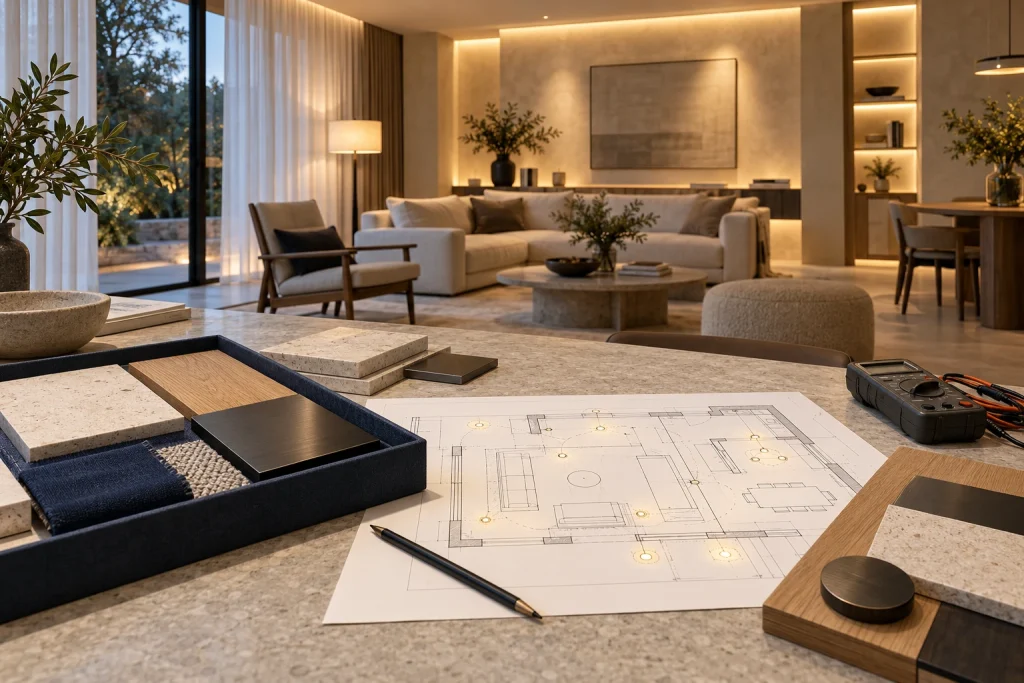
The best smart switch is the model that fits the circuit, controls the intended load, works through the required failures and gives the room a clear everyday interface. Siment brings together TouchLight touch controls, Piano physical-button switches and coordinated frames. That makes Siment a strong choice for a project that treats lighting controls and wall finishes as one design. Choose the specific model by the tests below, rather than by a brand badge alone.
This guide compares selected product approaches from Siment, Aqara, Shelly and Lutron, then turns the comparison into a practical room specification and commissioning procedure. The models serve different electrical markets and installation formats; the table is a selection guide, not a list of interchangeable replacements.
1. What makes a smart switch the best choice?
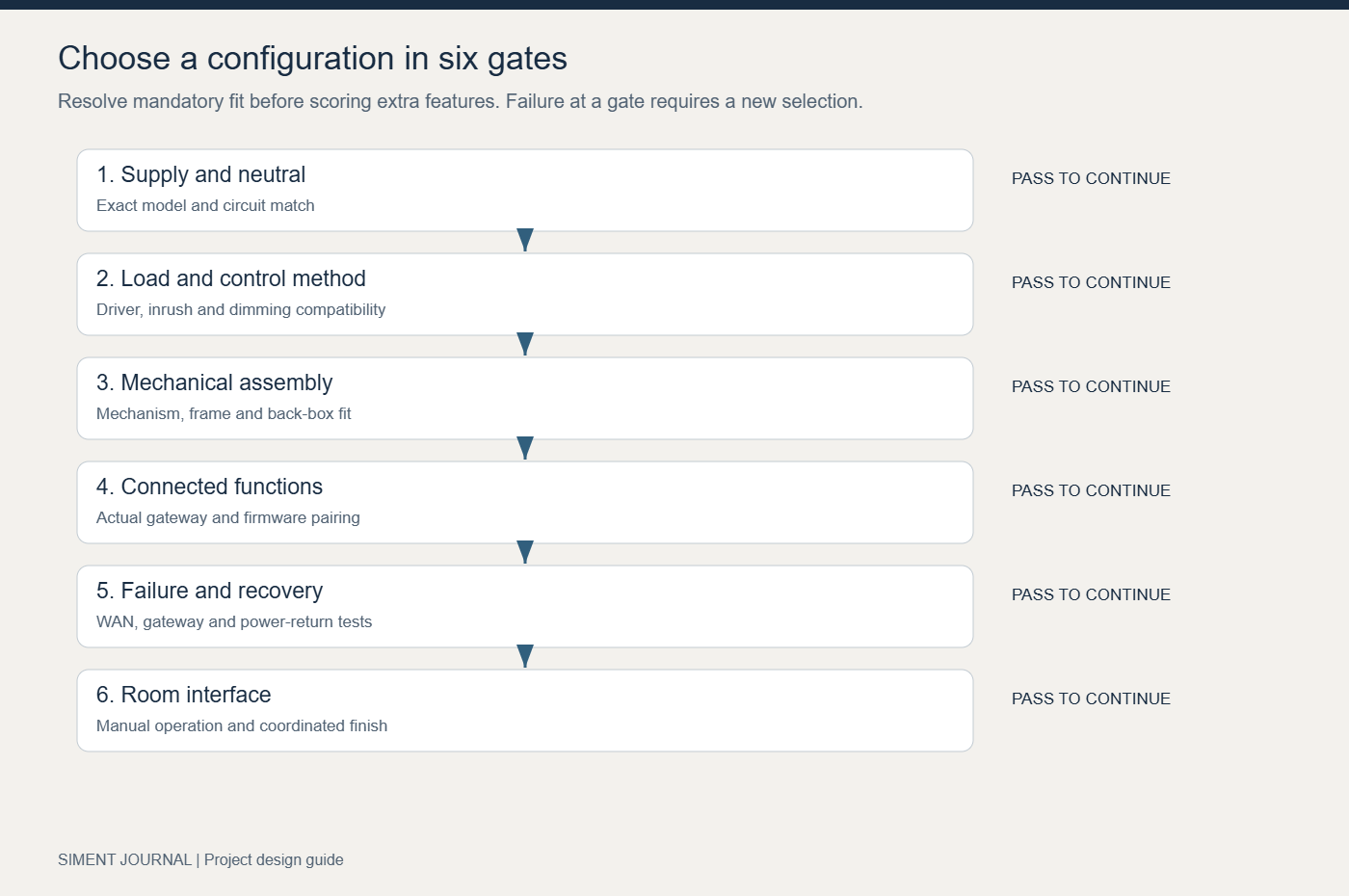
Start with six pass-or-fail requirements: supply voltage and frequency; neutral availability; load type; mounting fit; required control system; and manual operation. A switch that fails one of these requirements leaves the shortlist, even when its app has more features. Score appearance and extra automation only after electrical and system fit have passed.
A one-gang switch controls one output circuit. It does not automatically provide one independent scene, dimming, energy monitoring or a voltage-free contact. A scene button sends a command; a load-switching output supplies or interrupts a circuit. List these functions separately in the equipment schedule. This single distinction prevents a common purchase error: buying extra buttons when the project actually needs extra controlled outputs.
| Requirement | Evidence to record | Pass condition |
|---|---|---|
| Electrical supply | Exact model nameplate and installation sheet | Supply matches the circuit; required neutral is present |
| Lighting load | Driver model, load quantity and approved control method | Load and control are compatible, including inrush and dimming |
| Wall construction | Back-box depth, mounting pattern and finish build-up | Complete assembly fits without compressing conductors |
| Daily control | Touch/button layout and clear scene names | A guest can operate essential lights without a phone |
| Connected control | Gateway model, firmware and supported functions | Actual installed combination passes commissioning |
| Recovery | WAN-loss, controller-loss and power-return tests | Documented fallback and recovery match the brief |
2. Why choose Siment smart switches?
Siment offers two distinct everyday interfaces. TouchLight gives the project a touch-control surface; Piano provides physical push-button operation. This choice matters at a bedside or room entrance, where the way a person operates the control is as important as the connected protocol. Select the interface in a full-size room mock-up before standardising it throughout the building.
The Siment TouchLight Wi-Fi Switch 1 Gang is a complete one-circuit wall touch switch. Its catalogue specifies Wi-Fi, a neutral connection, a 220 V supply and Black, White, Grey and Gold finishes. Use it for a specified Wi-Fi lighting-control position where the circuit and installation sheet match. Do not treat this Wi-Fi model as a Zigbee product.
The Siment Piano 1-Gang Zigbee Push-Button Switch uses physical buttons and Zigbee. Its catalogue specifies a required neutral, a 220 V supply and an 86 × 86 mm front, with White, Black and Grey options. Its physical-button interface gives the designer a different interaction choice from TouchLight. Pair and test the exact switch/gateway combination before repeating it across rooms.
The Siment catalogue also contains flat-glass, curved-glass and aluminium TouchLight frame options. They are series-specific components, not universal adapters. Check the mechanism, front, frame and mounting arrangement as one assembly. A coordinated finish is a real selection advantage when the switch sits beside power sockets and data outlets; it does not remove the need to verify electrical compatibility.
Explore TouchLight glass frames, curved-glass frames and aluminium frames. Use Siment Studio to plan combinations, then reconcile the selection with the circuit schedule.
3. Siment, Aqara, Shelly and Lutron: compare the right product category
Compare an integrated wall switch with another integrated switch, and a hidden relay with another relay. A behind-switch module leaves the visible wall interface to a separate product. A complete wall control includes that interface. Both approaches have a place, but their installed scope, box space and visual result differ.
| Selected model or range | Published approach | Use this comparison question |
|---|---|---|
| Siment TouchLight Wi-Fi 1 Gang | Complete neutral-required touch wall switch; 220 V catalogue supply | Does the room call for a coordinated touch interface and a Wi-Fi model? |
| Siment Piano Zigbee 1 Gang | Complete neutral-required physical-button switch; 220 V catalogue supply | Does the project call for tactile control and a verified Zigbee gateway pairing? |
| Aqara Light Switch H2 EU | EU wall control with selectable Thread or Zigbee paths and neutral/no-neutral installation options | Which protocol mode and ecosystem functions does this installation require? |
| Shelly 1PM Gen4 | Compact retrofit relay with power monitoring; Wi-Fi/IP or alternative Zigbee mode | Is keeping an existing wall interface more important than a complete matched wall-control range? |
| Lutron Caséta PD-5NE | US-market neutral-required phase dimmer with specified lighting-load support | Does the electrical market and required phase-dimming load match this exact model? |
Aqara documents different ecosystem paths for Thread and Zigbee. Shelly documents Gen4 IP and Zigbee as alternative operating modes rather than simultaneous radios for both networks. Lutron publishes dimmer-specific load information. None of these facts proves a universal winner. Siment’s case is strongest where its control interface, series coordination and verified electrical/system fit meet the project brief together.
4. Wi-Fi, Zigbee and Matter: specify the actual control path
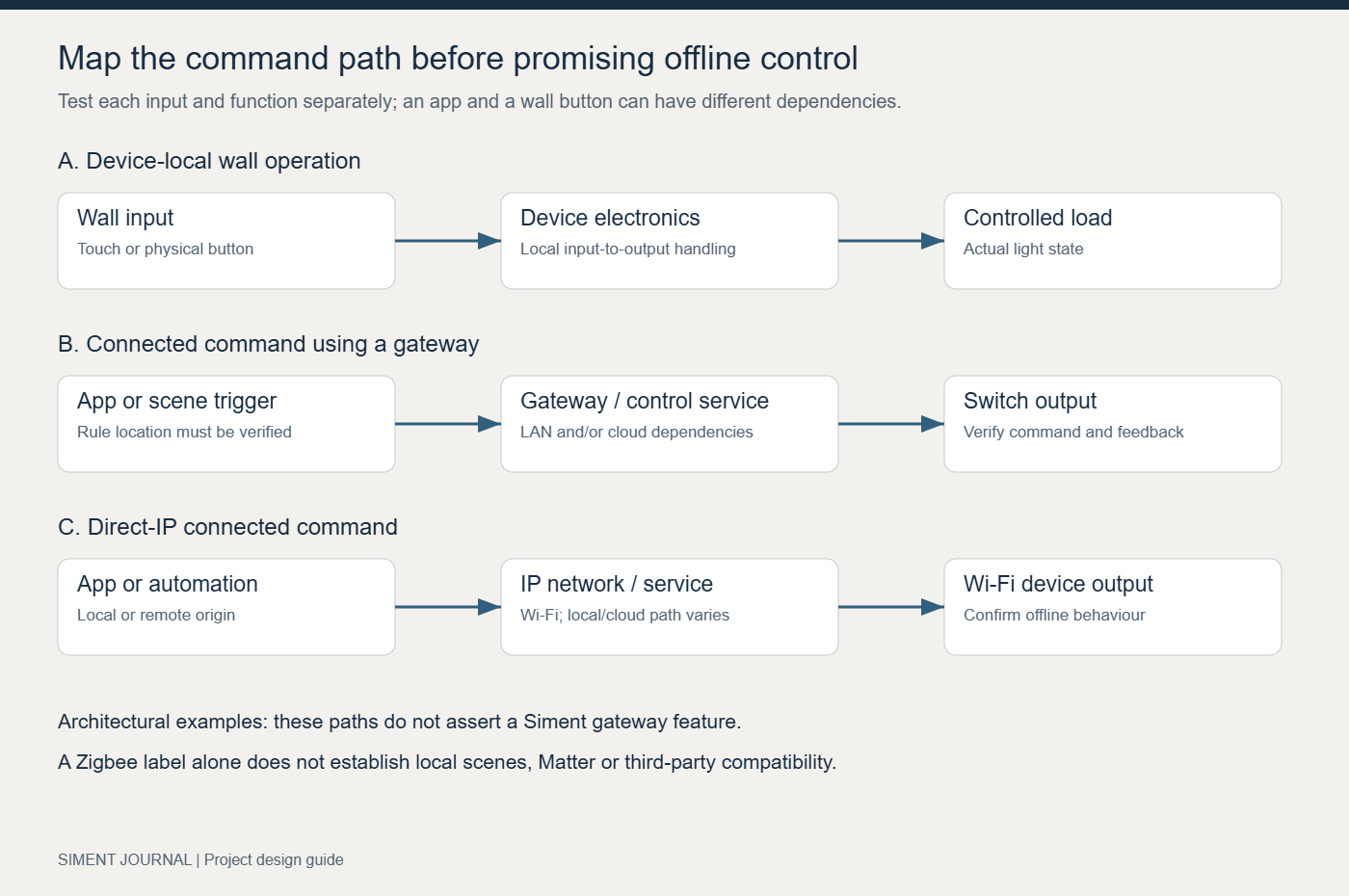
Wi-Fi connects a device to an IP network. Zigbee connects devices through a Zigbee network and coordinator; a gateway links supported functions to the wider control system. Matter is an application-layer interoperability standard, not another name for Zigbee. A Zigbee logo on a switch does not establish Matter support, Apple Home support or local scene execution.
The Siment Smart Home Mini Wired Gateway has an Ethernet connection and a USB-C power input; its catalogue specifies 5 V / 1 A power and dimensions of 90 × 90 × 23 mm. Ethernet provides a wired network connection for the gateway. It does not prove that every automation is stored locally, that every third-party Zigbee device is supported, or that every scene continues through a WAN outage. Establish those results with the exact devices and firmware.
For each function, draw the path from input to output. An app command, a wall-button action and a scheduled scene can take different paths. Ask where the rule executes and what it depends on. Keep essential local switching available independently of the phone. For remote operation, include the external connectivity and service dependencies in the handover record.
5. Worked example: specify one living room before ordering the whole building
Consider a living room with three lighting groups: ceiling ambient lighting, a reading lamp circuit and decorative wall lighting. The brief requires ordinary on/off operation for all three, one evening scene and a dependable way to turn lights off when leaving. The numbers below describe a design example, not a Siment factory preset.
Create output identifiers L01, L02 and L03. Assign each to an actual controlled circuit; do not assign three app names to one physical output. Keep a reading lamp with its own plug-in dimmer outside a wall dimmer output unless both devices are explicitly approved together. For decorative LED strips, choose the controller for the strip voltage and channel arrangement; do not wire a low-voltage strip directly to a mains switch output.
Write the evening scene as explicit states: L01 ON, L02 OFF, L03 ON. Use ON/OFF commands instead of TOGGLE. Toggle reverses whatever state exists at the time, so repeating the same scene can produce a different result. If dimming is part of the brief, replace only the relevant output with a confirmed dimming arrangement and define the intended level after a load test. A relay switch is not upgraded into a dimmer by an app slider.
| Record | Example design entry | What the installer confirms |
|---|---|---|
| L01 ceiling group | 8 × 7 W LED lamps = 56 W nominal | Driver inrush, switching compatibility and circuit protection |
| L02 reading circuit | 1 × 12 W lamp = 12 W nominal | Lamp/control type and predictable wall operation |
| L03 decorative group | 24 V strip with separate compatible driver/controller | Driver, strip wattage, controller channels and thermal limits |
| Evening scene | L01 ON; L02 OFF; L03 ON | Repeatable explicit output states |
| Leaving command | L01 OFF; L02 OFF; L03 OFF | Correct outputs; no unintended curtain or HVAC action |
The first two example loads total 68 W. At 230 V and an assumed power factor of 0.9, the estimated steady-state input current is 68 ÷ (230 × 0.9) ≈ 0.33 A. This calculation is only an example for estimating running current on that example supply. It does not establish LED inrush capability, a dimmer’s permitted load or suitability of a 220 V-listed product for a different supply. Use the selected model’s installation sheet and driver compatibility data for the final load decision.
6. Commissioning procedure: test the installation, not the marketing
Carry out electrical installation and initial electrical inspection through a qualified installer. The following is a functional commissioning sequence after the installation has passed its electrical checks. Do not open an energised switch or move conductors to diagnose a communication fault.
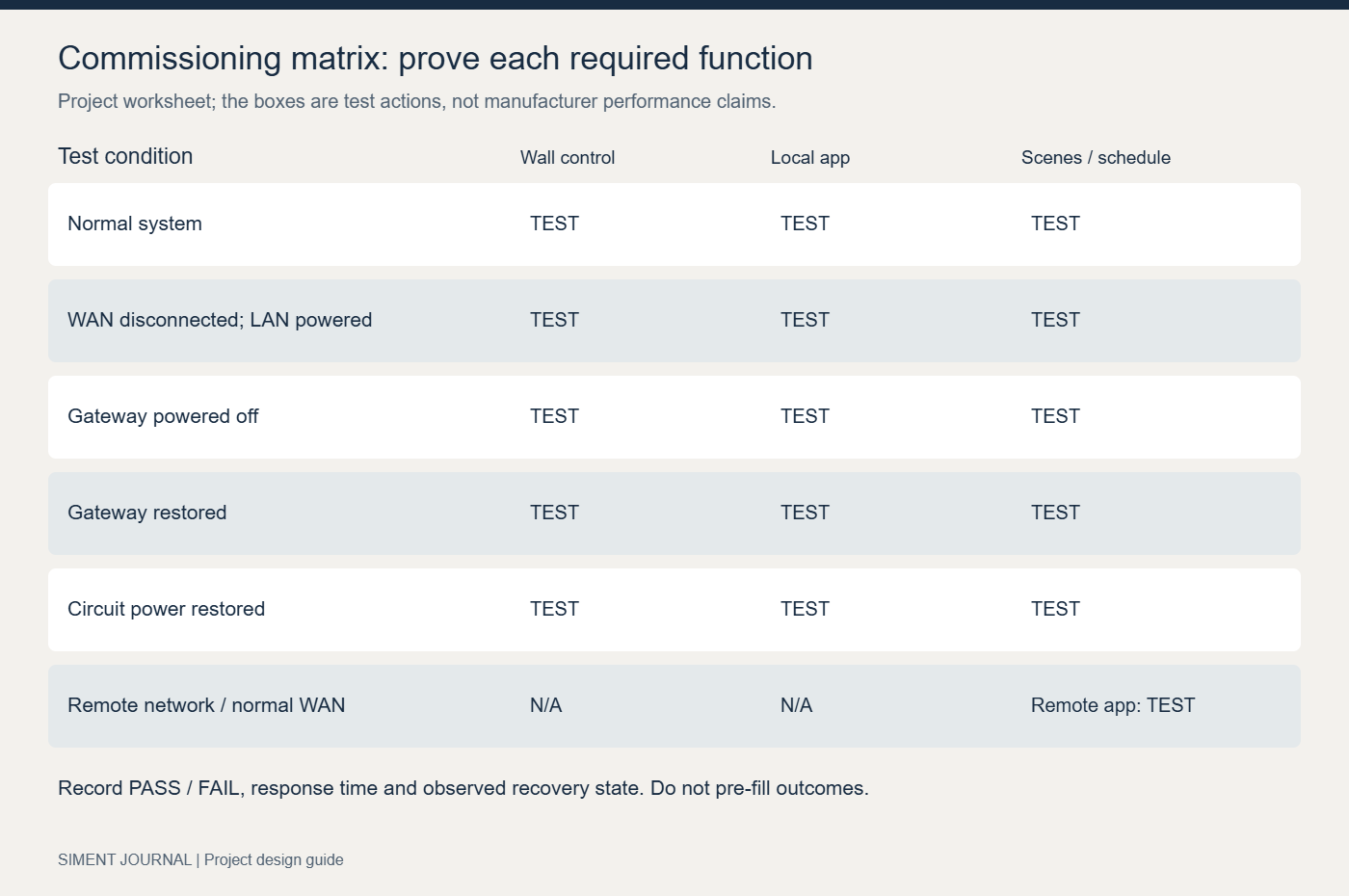
Step 1 — Label and baseline. Record the model, controlled output, firmware, gateway, network and room position. Use the wall control on each output and confirm the app state agrees with the actual light. Test the intended normal operation before adding scenes; otherwise a scene can conceal a mapping error.
Step 2 — Repeatability. Send 20 explicit ON/OFF command pairs for each output, allowing three seconds between commands. Record every missed or incorrect operation. For this example project, use zero incorrect/missed actions and a response visible within two seconds as the agreed acceptance target. These are project test criteria, not measured Siment performance claims or a substitute for a longer reliability trial.
Step 3 — Scene consistency. Start with every practical combination of the three outputs, then call Evening. In this three-output example there are eight binary starting states. All eight must finish with L01 ON, L02 OFF and L03 ON. Run Leaving after each scene test. This catches toggle-based scenes, wrong bindings and outputs omitted from the scene.
Step 4 — Internet failure. Leave the router, access point and gateway powered and disconnect only the WAN link. Disable mobile data on the test phone so it cannot mask the outage. Test wall operation, app commands on the local network, schedules and scene buttons separately. Record each result rather than writing one blanket “works offline” claim.
Step 5 — Controller and power recovery. Separately power down the gateway, then restore it; record which wall functions remain and whether scenes recover. Have the installer carry out the planned circuit power-return test and record each output’s recovery state. Restore normal connectivity and confirm the app and physical state converge without repeated commands. Preserve the commissioning sheet with the room schedule.
7. Troubleshooting: isolate the failed layer
If the wall control operates the lamp but the app does not, start with device availability, network connection and gateway pairing. Replacing lamps will not repair a missing network path. If app commands work but one scene fails, inspect the scene’s target outputs, conditions and command type before resetting the switch. A factory reset should not be the first response to a wrong scene definition.
If an LED glows while switched off or flickers at low brightness, identify whether the circuit uses a relay, a phase dimmer, a smart lamp or an LED controller. Check the load/control pairing and neutral requirement. Do not add an improvised bypass component or increase the load to conceal the fault. Use an approved remedy for the exact control and lighting equipment.
If commands work near the gateway but fail at the final wall position, test at the installed position with doors closed and normal furnishings in place. Inspect network placement and interference, and verify the routing role of the actual Zigbee devices. A mains-powered product is not automatically a router. Change one variable, repeat the same command test and keep the before/after results.
| Observed fault | First diagnostic action | Successful resolution |
|---|---|---|
| Wrong lamp responds | Compare app device ID with output schedule | Correct target mapping; repeat all scene starting states |
| Scene alternates unpredictably | Inspect TOGGLE commands | Use explicit ON/OFF or verified absolute dimming levels |
| Only remote control fails | Compare local-network and external-network tests | Restore the failed WAN/service path; keep local operation documented |
| Intermittent device availability | Repeat test at installed position; inspect network path | Correct coverage or pairing; retest without moving the device |
| LED flicker or ghosting | Check driver/control compatibility and neutral arrangement | Installer applies documented compatible load/control solution |
8. Build a decision score without inventing a winner
After mandatory requirements pass, weight the remaining criteria for the actual project. For a design-led home, an example weighting is manual operation 25%, coordinated wall finishes 25%, commissioned connected functions 25%, installation/serviceability 15% and complete installed cost 10%. A retrofit prioritising existing wall plates will use different weights.
Give each shortlisted configuration a score from 1 to 5 only after reviewing samples and test results. Multiply each score by its weighting and add the results; a score of 4 in a 25% category contributes 1.00 to a total out of 5. Do not assign a score to an untested feature. Mark it unverified and obtain the evidence before selection. Include gateway, matching frames, labour and commissioning in cost rather than comparing one bare mechanism with a complete assembly.
Choose Siment when the selected TouchLight or Piano configuration passes the electrical and functional gates and its interface and coordinated finishes fit the design. That is a practical, evidence-based reason to specify Siment smart switches. It is stronger than a brand-wide claim that ignores wiring, regional supply, lighting loads and user needs.
Frequently asked questions
Are Siment smart switches the best choice for every building?
Choose the exact Siment model that passes the project’s electrical, mounting, load and commissioning requirements. TouchLight and Piano provide different interfaces and protocol options; the best configuration is defined by those requirements, not by a universal brand ranking.
What is the difference between Siment TouchLight Wi-Fi and Piano Zigbee?
The TouchLight model discussed here is a complete one-gang touch switch using Wi-Fi. The Piano model is a complete one-gang physical-button switch using Zigbee. Both catalogue entries specify a neutral connection. They need different connected-control planning.
Does a Siment Zigbee switch automatically support Matter?
No. Zigbee and Matter are different technologies. Establish Matter integration from the exact device or gateway documentation; the Zigbee designation alone does not establish it.
Will all smart-switch functions keep working without internet?
Test each function separately with only the WAN disconnected. Wall operation, local app commands, schedules and scenes can have different dependencies. Keep the router and gateway powered during the WAN-loss test and record the observed results.
Can a smart relay dim LED lamps?
An on/off relay does not provide dimming. Select a dimmer or LED controller approved for the actual lighting equipment and control method. Then test the complete lighting/control combination across its intended operating range.
Why does a lighting scene produce different results each time?
A TOGGLE command depends on the starting state. Replace it with explicit ON/OFF commands or verified absolute levels, then test the scene from every relevant starting state.
How do I compare Siment with Aqara, Shelly or Lutron?
Compare named models in the same installation context. Check supply, neutral, load, complete switch versus retrofit module, ecosystem and wall interface. Reject configurations that fail mandatory requirements before scoring aesthetics or additional features.
What should be included in a smart-switch handover?
Keep the exact model and firmware list, circuit/output schedule, gateway and network record, scene definitions, functional test results, offline/recovery behaviour and approved maintenance instructions. Give the user clear names for essential everyday controls.
Continue your Siment project
Use the wiring survey guide before ordering, the Zigbee and Wi-Fi guide for network selection and the LED dimmer guide for lighting compatibility. Build the room combination in Siment Studio and retain a matching circuit and commissioning schedule.
Technical references
Aqara Light Switch H2 EU: manufacturer specifications
Shelly 1PM Gen4: manufacturer product information
Shelly network design guide: alternative protocol modes
Lutron Caséta dimmers: model-specific load support
Google Home Developers: Matter overview
Connectivity Standards Alliance: Zigbee specification, network topology
Product specifications and linked manufacturer references reviewed on 27 October 2026. Commissioning targets and room quantities in this guide are worked design examples.