
How to Choose an LED Dimmer and Solve Common Dimming Problems
26.10.2026

Quick answer: Match an LED dimmer to the driver’s control method, supply, permitted load and supported dimming range. For low-voltage strips, select the correct DC controller and power supply. A general current rating alone does not prove LED compatibility.
Identify where the light level is controlled
Start with the lighting equipment, not the wall front. Read the driver’s specified input, output and dimming interface. Mains phase-control dimming, a dedicated control interface and low-voltage strip control are different architectures. They are not interchangeable because the app presents a brightness slider.
A relay switch turns its output on or off. A dimmer varies the light level through the control method its hardware supports. A low-voltage LED controller operates compatible strips after the correct power supply. Choose the device that belongs to the actual electrical arrangement.
The Siment TouchLight Zigbee Touch Dimmer Module provides a touch interface for lighting-level control through Zigbee. Confirm its installation instructions and approved driver/load arrangement before specification; the communication protocol does not identify the output waveform or compatible lamp count.
Distinguish constant-voltage strips from other LED loads
A constant-voltage strip uses the supply voltage specified for that strip and a compatible control arrangement. A constant-current LED module requires an appropriate current-regulated driver. A product intended for one arrangement must not be substituted into the other without a documented compatible design.
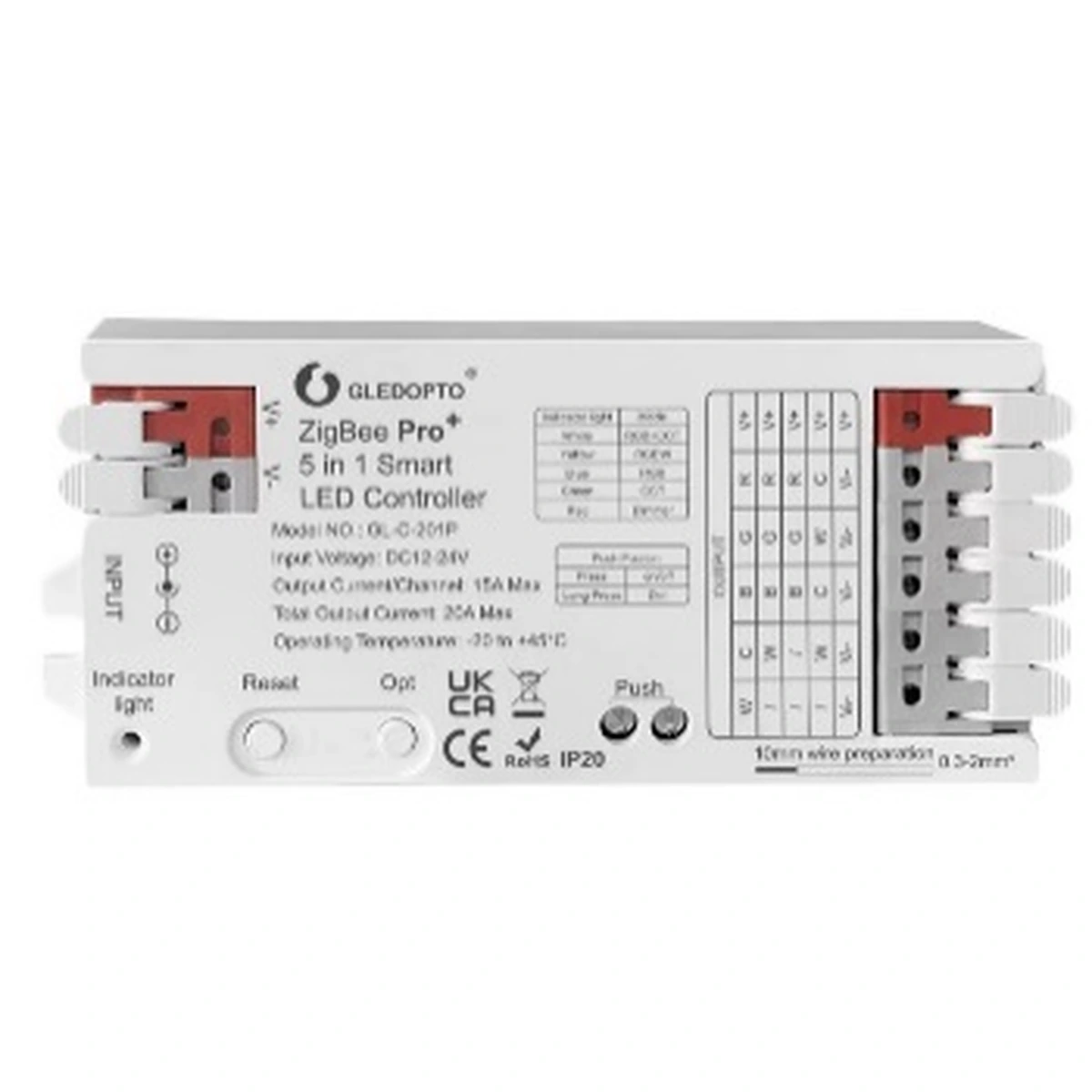
The Siment Zigbee Smart LED Controller Module V2 is specified for 12–24 V DC LED-strip control. Its maximum combined output is 20 A, and an individual channel is limited to 15 A while remaining within that 20 A total. Do not add the per-channel maxima and treat the result as the permitted total.
At 24 V, a 100 W strip load draws approximately 4.17 A before considering design allowances. This is an arithmetic example using I = P / V, not an approval for a particular installation. The designer must also check strip type, channel distribution, cable losses, ambient conditions and the power supply’s permitted loading.
Selection at a glance
| Lighting arrangement | Required selection check |
|---|---|
| Relay-switched LED driver | Permitted LED switching load and inrush |
| Mains dimmable driver | Supported dimming method and approved dimmer |
| Constant-voltage LED strip | Correct DC voltage, strip type and controller channels |
| Constant-current LED module | Compatible current-regulated driver and interface |
| SI-TLZLEDCR controller | 12–24 V DC; 20 A total; maximum 15 A on one channel within that total |
Check startup behavior as well as steady wattage
The steady power of an LED lamp does not describe the current drawn when its driver starts. Capacitive input stages and driver behavior affect the load seen by the control. This is why a headline incandescent rating must not be used as an LED rating.
Use the control manufacturer’s approved load information and the lighting driver’s compatibility data. Check both the maximum permitted quantity and any minimum-load requirement. A low-wattage installation is not automatically easier for every dimmer to control.
Avoid applying numerical limits from another manufacturer’s tested lamp/dimmer combination to a Siment product. General application guidance explains the selection problem, while exact-model documentation establishes the installation limits.
Commission the complete dimming range
Test the selected driver and lighting equipment with the intended dimmer before repeating the circuit across a project. Check startup from off, changes through the full supported range, operation at the low end and response after power restoration.
Where the product supports minimum-level or trim settings, configure them within the documented procedure to avoid an unstable operating region. A software setting does not make a non-dimmable driver compatible. Check the electrical arrangement first.
For low-voltage strips, compare output at the beginning and end of the run. Have the designer assess conductor sizing and approved feed arrangements. Increasing the app level cannot correct a supply mismatch or excessive voltage drop.
Record the accepted combination for future maintenance
Document the exact dimmer, driver, strip or lamp references and the installed quantity. Include the approved configuration, relevant settings and observed recovery behavior. A replacement lamp described only as the same wattage does not establish equivalent dimming performance.
Separate local dimming tests from network tests. If the electrical load dims correctly from its supported local interface but fails from the app, investigate gateway support and command mapping. If it flickers locally, changing the Zigbee channel does not correct driver incompatibility.
Give the owner clear instructions for normal operation and identify the correct replacement lighting equipment. Keep electrical diagnosis with a qualified professional, particularly where a device overheats, trips protection or shows damaged connections.
Technical control map
The following map explains functional relationships. Electrical connections must follow the exact product instructions and the installation design.
| Low-voltage strip control path | Role |
|---|---|
| Compatible DC supply → LED controller | Supply voltage matches controller and strip |
| LED controller → compatible strip | Correct type and channel-current distribution |
| Gateway → controller | Supported wireless control commands |
Technical troubleshooting
The lamp flickers at low level
Check driver compatibility and the permitted load range. Apply supported minimum-level settings only after confirming the electrical combination.
The light glows when switched off
Have the electrician inspect the circuit, leakage paths and documented load/accessory requirements. Use only manufacturer-approved bypass arrangements.
The controller or supply becomes excessively hot
Stop using the affected circuit and have the installer inspect loading, voltage, terminals, enclosure conditions and channel limits.
Brightness is uneven along a strip
Check voltage drop, conductor sizing and the specified feed arrangement. Do not compensate by exceeding controller or supply limits.
Related Siment products
Siment Zigbee Smart LED Controller Module V2 — A 12–24 V DC Zigbee controller for LED-strip lighting.
Siment TouchLight Zigbee Touch Dimmer Module — A Zigbee touch dimmer module for TouchLight wall controls.
Siment Smart Home Mini Wired Gateway — A wired-network gateway for the connected-home system.
Explore the wall-control arrangement in Siment Studio. Confirm the final product configuration against the circuit schedule and installation instructions.
Frequently asked questions
Can every LED lamp be dimmed?
No. The lamp or driver must explicitly support a compatible dimming method.
Does Zigbee determine which LED driver is compatible?
No. Zigbee describes communication. The output topology and permitted load determine electrical compatibility.
Can the Siment LED Controller Module V2 connect directly to mains?
No. It is specified for a 12–24 V DC supply and compatible LED-strip control.
Can each channel carry 15 A at the same time?
The total remains limited to 20 A. Each individual channel must also remain at or below 15 A.
Does changing a brightness setting fix an incompatible driver?
No. Confirm the correct driver, dimmer and load arrangement before adjusting supported software settings.
Continue reading
Smart Switch Wiring: What to Check Before You Buy
Lighting Scenes for Living Rooms, Bedrooms and Kitchens
Technical references
Siment Zigbee Smart LED Controller Module V2
Siment TouchLight Zigbee Touch Dimmer Module